
How do I get an instant price quote?
Use our Design Tool
Our Design Tool automatically calculates and shows the price of your order before you checkout. Once you’re done designing, double-check that you have the right print type and decoration method/s (if any) selected.
Then, at the top of the canvas, enter the number of items you want to order. The Design Tool will also tell you the minimum order quantity (MOQ) for your selected product.
Once you’ve placed all the details, you'll get an instant price quote at the top of the canvas, which includes:
- Price per item
- Total price
- Estimated delivery date
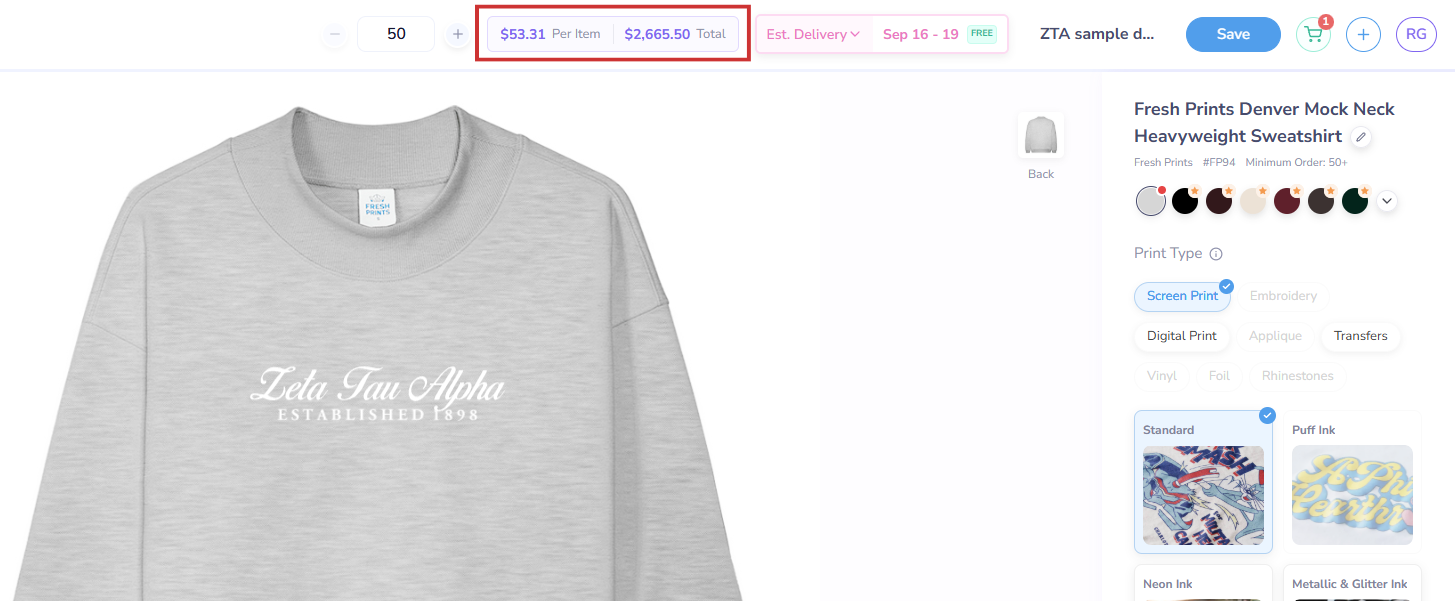 Get a quote for your merch on the Fresh Prints Design Tool
Automatic price updates
If you change anything about your merch design - like the print type, decoration method, print locations, product etc. - the Design Tool will update the price quote and estimated delivery timeline as well.
If you’re interested in doing a more unique or complex order, you can reach out to us at hi@freshprints.com or contact your Account Manager. We’ll send you a quote and help make your order happen!
Does this answer your question? If not, explore the questions on the left side or go back to our FAQ page